
The question usually arrives fully formed: “what does Microsoft 365 cost for ten people?” And the honest answer is mildly disappointing, because it starts with another question: ten people doing what?
That is not consultant evasion. The gap between the cheapest plan and the most complete one is roughly three to one, and what decides it is not the headcount — it is what those people actually need to do. Ten people who live in email cost one thing; ten people who all need Office installed, encrypted laptops and conditional access cost something quite different. But useful numbers do exist, and putting them in order is what this article is for.
The calculation everybody makes
Licence price × 10 users × 12 months. Done.
That calculation is correct and incomplete, in the same way the sticker price of a car is correct and ignores fuel, insurance and the mechanic. It is good for comparing plans against each other, and that is the only thing it is good for. It will not tell you what the first year costs, and the first year is the one people budget for.
For current figures, always check the official business plans page, because prices move and blog posts age. What does not move is the structure of the decision, and that is the part worth understanding.
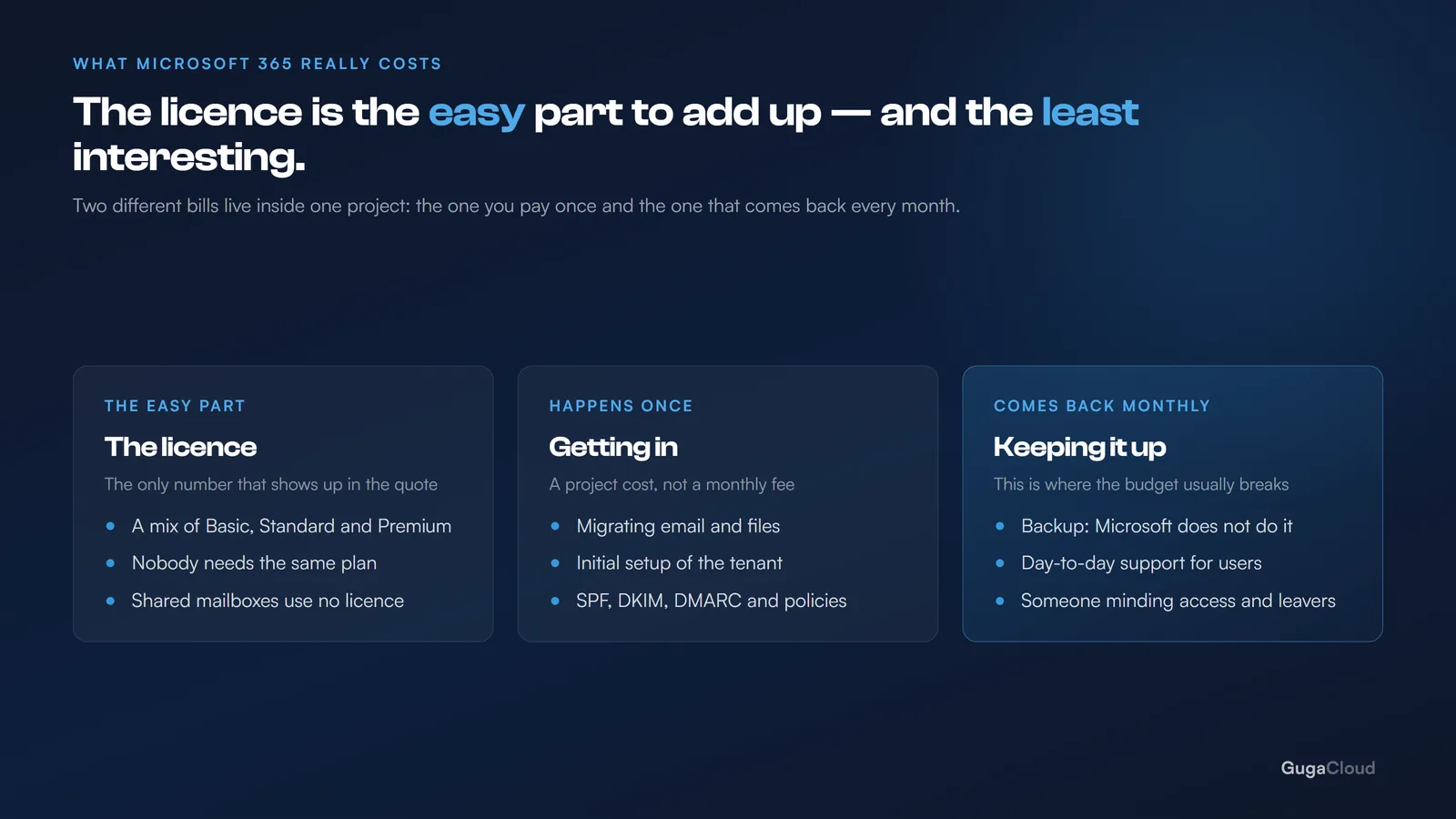
What actually goes into the number
1. The licences, but not the same one for everybody
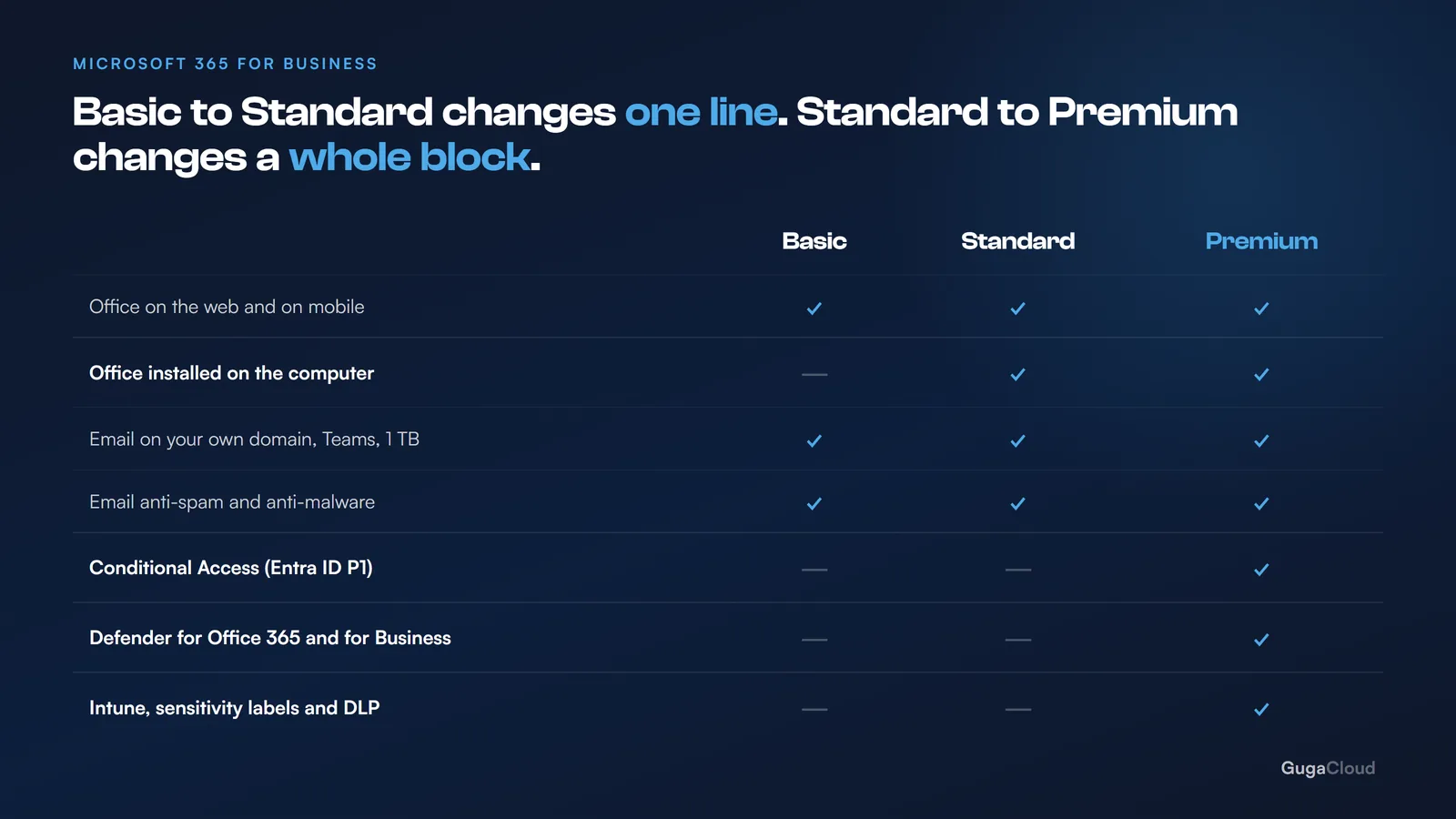
The most expensive licensing mistake is treating everyone identically. The plans coexist happily in the same tenant, and in a ten-person company the typical design looks like this:
- two or three people on Premium — anyone with access to money, to sensitive data, or to administrator privilege;
- four or five on Standard — anyone who depends on Office installed on the computer;
- two or three on Basic — anyone who lives in email and Teams.
Ten Premium licences cost three times ten Basic ones. The mixed design usually lands somewhere in the middle, covering the risk where the risk actually sits rather than spreading the spend evenly across people who do not need it. The full reasoning behind that split is in Business Basic, Standard or Premium.
2. The accounts that do not need a licence at all
This is where there is a saving almost nobody takes: a shared mailbox does not consume a licence.
contact@, finance@, sales@, support@ — if these are addresses that several people open, rather than actual human beings, they should be shared mailboxes. They cost nothing.
In a lot of ten-person companies there are three or four of these being paid for as though they were employees. That alone often covers a meaningful slice of the migration cost, and it is a one-afternoon change. The same applies to the mailbox of anybody who has left and whose email still needs to be readable — it does not need a paid licence to stay accessible.
3. The migration
This is a one-off cost, and it varies according to where you are coming from. The factors that move the price:
- email volume — 20 GB and 400 GB are different schedules, not different prices for the same work;
- where you are leaving — moving off a mainstream hosting provider is straightforward; moving off a server you own is a different job;
- how many systems send email using your domain — the ERP, the HR platform, the website form, the printer. That list is always longer than anyone expects, and every item missed turns into an outage;
- whether there is a file structure to move across as well, or only email.
The detail behind all of that is in how to migrate email without stopping anything.
4. The backup
This is the item nearly every budget leaves out, and it is the one that hurts most when it is missing. Microsoft does not back up your data. Microsoft guarantees that the service stays available; it does not guarantee that the file somebody deleted comes back. The distinction is explained in Microsoft 365 backup.
Backup costs a few dollars per user per month. It is the cheapest line on the whole list and the only one whose absence can end the company. For ten people it is a rounding error against the licence total, which is exactly why leaving it out never feels like a decision at the time.
5. The initial configuration
Multi-factor authentication, access policies, the SharePoint structure, permissions, retention rules. Also a one-off cost, and it is what separates an environment that works from an environment that merely exists.
Can you skip it? You can. That is what happens when somebody “just creates the users”. Six months later the company has files scattered across personal OneDrive accounts, passwords with no second factor, and nobody able to say who has access to what. Fixing that afterwards costs more than doing it properly at the start — partly in hours, partly because by then people have built habits around the mess.
6. The support afterwards
Somebody is going to look after this. It might be a monthly contract, it might be ad hoc, it might be an employee. The one option that does not exist is “nobody” — that choice does not remove the cost, it just moves it to the day something breaks, when it is at its most expensive.
Where the real savings are
| Saving | What it usually returns |
|---|---|
| Shared mailboxes instead of licences | High, and immediate |
| Mixing the three plans | High |
| Removing licences from people who have left | Medium — and it is pure oversight |
| Annual instead of monthly billing | Medium |
| No installed Office for people who do not need it | Medium |
And where it does not pay to economise: backup, the initial configuration, and Premium for whoever handles money. Those three are precisely where cutting costs more than it saves — and where the cost arrives all at once rather than monthly.
The calculation that actually matters
Before comparing plans against each other, compare them against what you spend today:
- current email hosting;
- Office bought outright, where that exists;
- the file server — power, maintenance, backup, and the time of whoever looks after it;
- the hours lost to files that vanished, wrong versions, and email that never arrived.
In a good share of the small companies we work with, a well-designed Microsoft 365 setup costs close to what was already being spent. The difference is that the spending becomes predictable and somebody is accountable for it, which is usually worth more than the number itself.
The question to take into the conversation: how many of our email accounts are real people, and how many are addresses that several people open? If that second list exists, you have already found money.