
This is an article to read before you need it.
If you have arrived here in the middle of an incident, go straight to the first section and follow the order. If you arrived out of curiosity, better still: save the link somewhere you can find offline, because in a real attack the intranet may be exactly the thing that will not open.
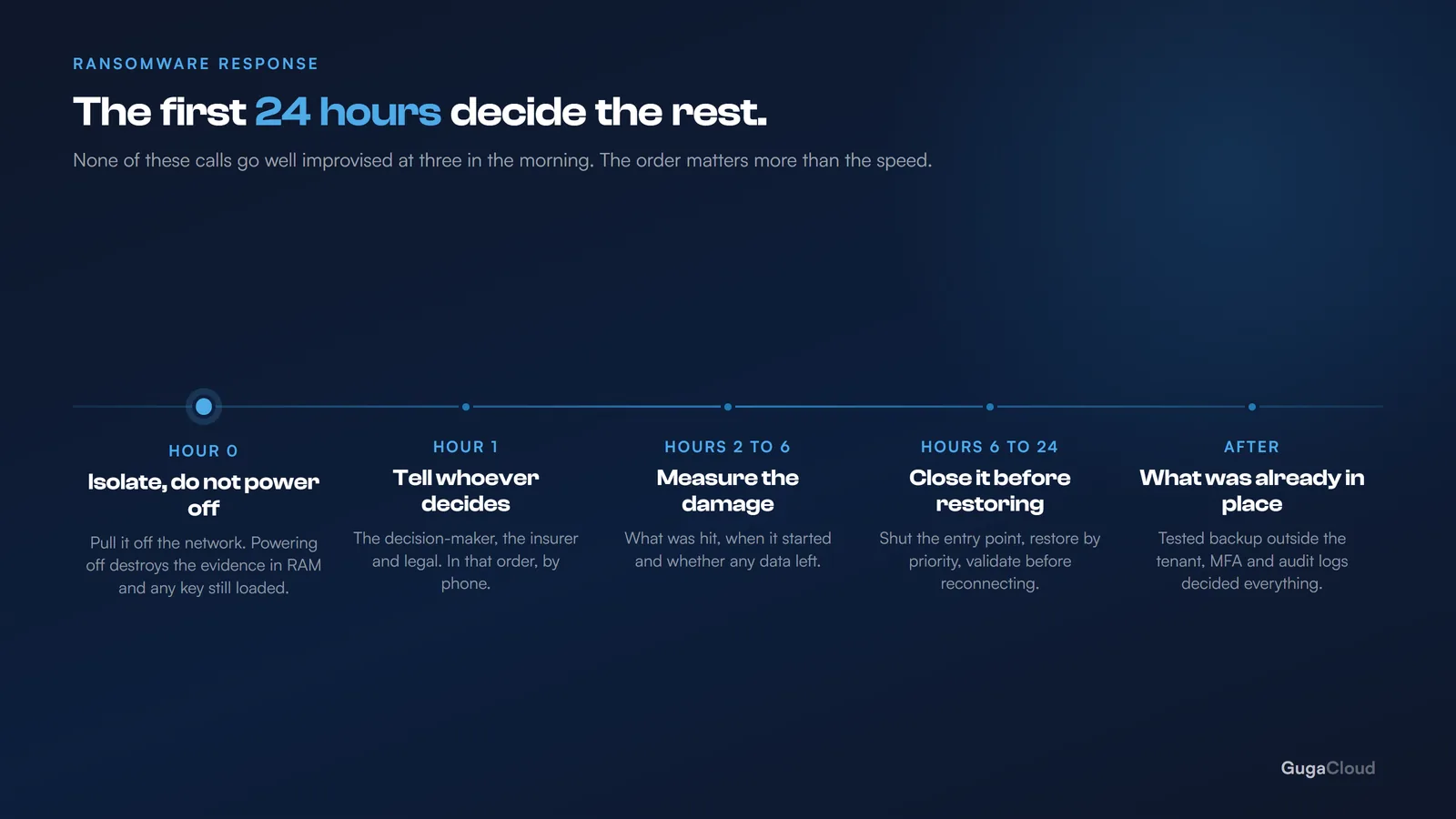
Hour 0: isolate, do not power off
The instinctive reaction is to pull everything out of the wall. Do not do that.
Cutting the power wipes RAM, and with it the evidence of how the attack got in — and, in some cases, an encryption key that was still loaded in memory. You defend yourself against the next minute and destroy your chance of understanding what happened and of recovering without paying.
Isolating the machine achieves the same thing without the cost: the encryption cannot spread and nothing can be exfiltrated, but everything that was in memory is still there if a specialist arrives later.
What to do, in this order:
- Take it off the network, leave it running. Network cable out, Wi-Fi off. The machine stays powered on.
- Isolate what has not been hit yet. If there is a file server, disconnect it from the network before the encryption reaches it.
- Cut off cloud access. Suspend the compromised accounts in Microsoft 365. Modern ransomware uses the person’s own credentials to reach synced OneDrive content and encrypt it in the cloud — and the cloud then obediently syncs the encrypted version out to everybody else.
- Stop syncing OneDrive and SharePoint on the machines that are still clean.
Step 3 is the one that gets forgotten most often and costs the most. Plenty of companies isolate the machines, breathe out, and discover the next day that the cloud content went too — including the files they were counting on to restore from.
Hour 1: tell the right people
Inside the company: whoever decides. The next few hours will require decisions about money and about communication, and those are not IT’s to make. Get that person on the phone early, even if you do not yet know the scale.
Outside: whoever is responsible for your environment — internal IT, your provider, your security vendor. If you have cyber insurance, notify the insurer immediately: many policies require notification within a short window and come with their own response team, and acting without telling them can affect the claim.
Legal. If customer personal data was involved, data protection law in your jurisdiction almost certainly sets notification deadlines — GDPR in Europe, and its equivalents elsewhere, are usually counted in hours rather than days. That assessment belongs to a lawyer, not to IT, and it starts now rather than once the restore is finished.
And one simple instruction for the team: do not delete anything, do not try to fix anything, do not pay anything. Well-intentioned people are the cause of half the evidence that gets destroyed — someone reinstalls a laptop to be helpful, and with it goes the only record of how the attacker got in.
Hours 2 to 6: work out the scale
Before you restore anything, you need three answers.
1. What was hit? Which machines, which folders, the server, the cloud. Write the list down — doing it from memory does not work, and you will be handing this list to other people: the insurer, the lawyer, whoever does the restore. Note what is encrypted and also what is merely suspect, because the two get handled differently.
2. When did it start? This is the question that decides the restore. If you restore yesterday’s backup and the attack began five days ago, you restore the attacker’s access along with the files. Microsoft 365 sign-in and audit logs are usually where you find the first strange login.
3. Did data leave? Modern ransomware groups copy data before encrypting it and use that as a second threat. Unusual outbound traffic in the preceding days is the indicator, and your firewall or cloud logs are where to look for it.
Hours 6 to 24: restore in the right order
First, close the door. Restoring before you know how they got in means being attacked again the following week, usually faster. Compromised password? Unpatched vulnerability? Remote access exposed to the internet? Fix it before anything goes back online.
Then restore by priority. Not everything at once: whatever stops the business first. Usually that is email, then the files in active use, then the rest. A written order agreed with the business beats improvising under pressure, and it stops three people restoring three different things at the same time.
It also helps to say out loud what “restored” means. A department that can send email and open this week’s files is working again, even if five years of archive are still being copied in the background.
Validate before you hand it back. A restored machine returns to the network only after it has been checked. One machine still infected re-contaminates everything you just rebuilt.
On paying the ransom
The decision belongs to the business owner, not to IT, and it deserves to be made with facts on the table:
- Paying guarantees nothing. A considerable share of those who pay do not get everything back, and the decryption tool they are given tends to be slow and unreliable.
- Paying marks you. Whoever paid goes onto a list of targets who pay.
- There may be a legal prohibition, depending on who is behind the group and where you operate.
- It does not fix the leak. If they copied the data, the payment buys a promise not to publish it. A criminal’s promise.
In practice, companies with a tested backup almost never pay. The ones who pay are almost always the ones who discovered, that morning, that the backup had not been working for months.
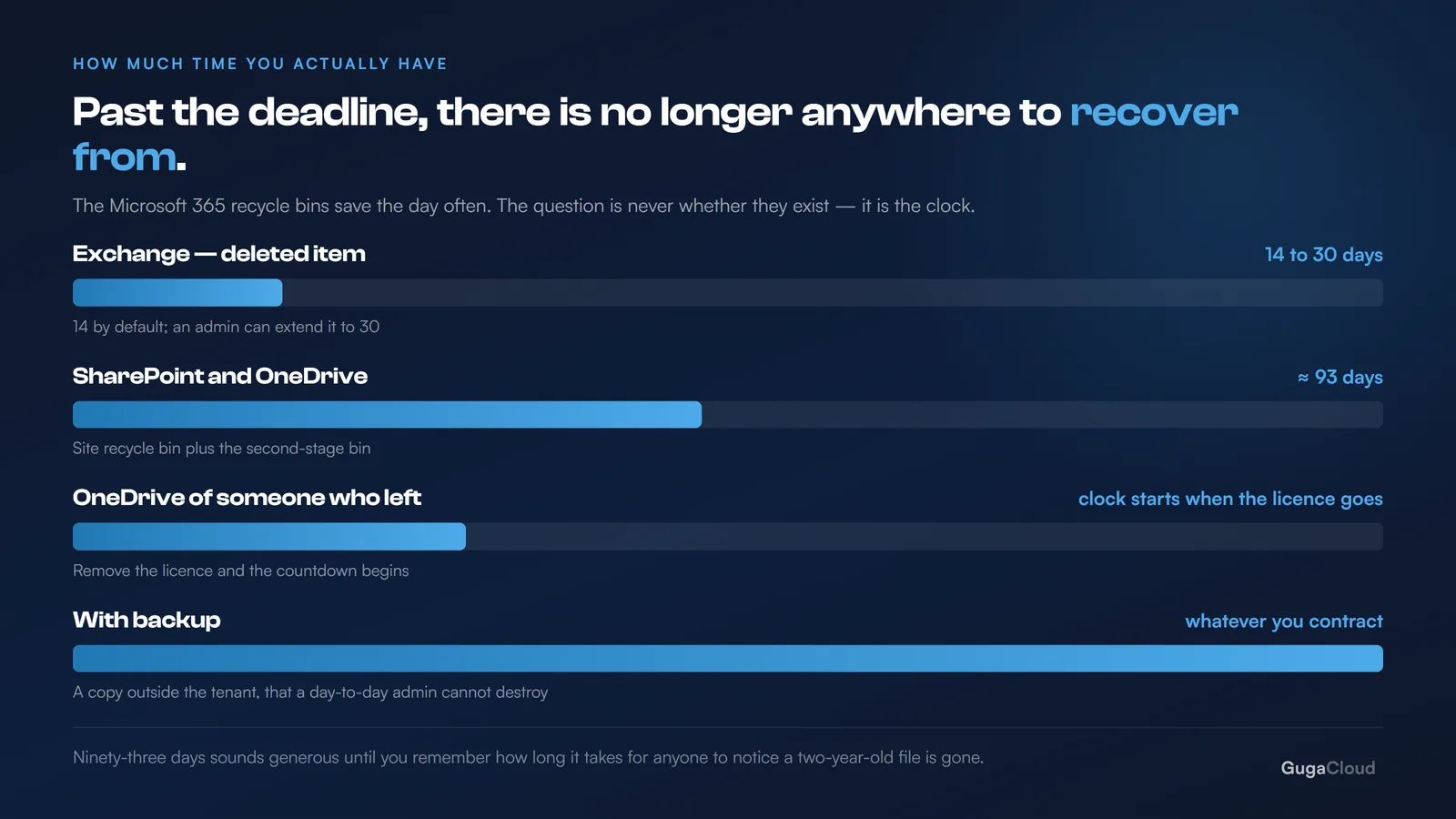
What decides all of this before it happens
Reading the playbook above, it becomes clear that the quality of every decision was determined before the incident:
| On the day you need to | Which depends on having already done |
|---|---|
| Restore from a clean point | Backup with long retention, outside the tenant |
| Know when it started | Audit logging enabled and preserved |
| Isolate quickly | Knowing where the data is and who accesses what |
| Decide about the insurer | Having a policy, and knowing its deadline |
| Not have been attacked | MFA, patching, Defender |
That is why Microsoft 365 backup and MFA come up so often here. It is not nagging: they are the two items that change the outcome of this particular day.
The test worth running this month
No elaborate simulation needed. Three questions:
- If the file server were encrypted right now, where would the restore come from — and when was it last tested?
- Who decides about paying, and does that person know it is their decision?
- Is the phone number of whoever looks after our IT written down somewhere that does not depend on the network?
If any of those answers takes a while to arrive, you have just found the most important piece of work in your month.